
Mastering Client Connect: How to Create High-Impact Email Campaigns
Consistency is the secret to building lasting client relationships, and email is the perfect bridge. Client Connect provides the tools you need to build, design, and track professional email campaigns that resonate with your audience. From basic updates to in-salon promotions, let’s explore how to leverage these features to grow your business.
Email marketing shouldn’t be a chore—it should be your most powerful tool for client engagement. Client Connect gives you the power to customize and segment your way to emails that not only get opened but also drive action, whether you’re launching a hot new service, running a gift card promotion, or simply checking in. Let’s dive in.
Build Your High-Impact Foundation
The Essential Power-Up
Before launching, ensure your communications are branded and connected. Upload your logo and sync your essential links (booking, social media) in your business settings. Your logo and contact info auto-populate the email header and footer for instant professionalism.
Connect Your Clients
Fuel your campaigns by keeping your client list up to date. Upload your list directly or seamlessly connect your point-of-sale software to keep your audience synced and ready for marketing.
Design That Demands Attention
Total Creative Freedom vs. Instant Polish
Choose your path to design success:
- Start from Scratch: Take total control with a blank template to perfectly match your unique brand vision.
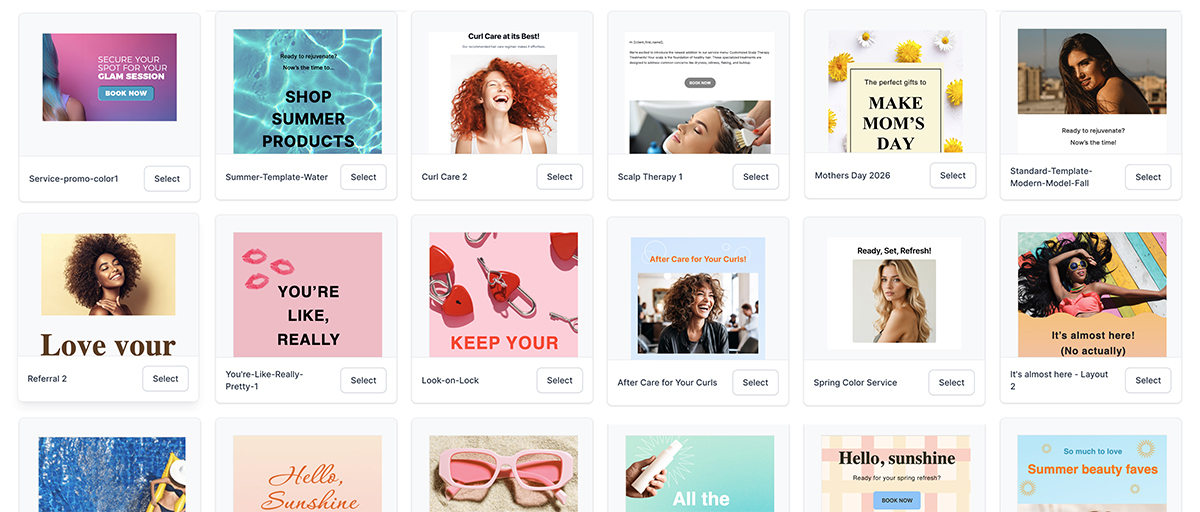
- Pre-Built Templates: Need speed? Our professional template library is categorized by goal—from announcements to product and service highlights so that you can create a polished email in minutes.
Make It Yours with the Easy Editor
Use our easy editor options to bring your vision to life:
- Customize the Core: Change the message, font, size, and color to make a bold statement.
- Visual Impact: Easily swap in your high-quality photos or select from a stock library.
- Drive Action: Insert custom buttons that link directly to your Online Store, booking portal, or website.
- Deep Personalization: Boost engagement by using custom placeholders to insert a client’s first name, your booking link, or salon details, making every email feel like a personal conversation.
Smart Segmentation: The Key to Higher Conversions
Stop Spraying and Praying
The true secret to high open rates and conversions is sending the right offer to the right client. Client Connect’s segmentation power makes this simple.
Target Your Audience
Use smart filters to create lists for clients who:
- Purchase Behavior: Have or have not purchased products from you.
- Appointment Status: Have upcoming or past appointments.
- Service History: Have or have not had a service in a while (perfect for re-engagement).
- Staff Preference: Book with a specific service provider.
- Create Custom Tags: Maximize niche campaigns by tagging clients (e.g., open house attendees, cut-a-thon participants, newsletter signups, etc.) and filtering your email send list by that specific tag.
Leveraging smart segmentation, customization, and powerful templates transforms your Client Connect email campaigns into an essential communication tool.
Measure Your Success and Scale What Works
If You Don’t Track It, You Can’t Grow It
Sending a beautiful email is only the starting line. Use the Client Connect tracking to monitor your key metrics and continuously refine your strategy.
Key Performance Indicators (KPIs)
- Open Rate: Indicates if your subject lines are compelling and your segmentation is sharp.
- Click-Through Rate (CTR): Measures if your content is relevant and your Call to Action (CTA) is clear and motivating.
- Unsubscribe Rate: A high rate is a red flag—it may mean you need to adjust frequency or re-evaluate content relevance.
Analyze these insights to optimize your subject lines, sharpen your audience filters, and celebrate what works to help drive client loyalty and business growth.
Learn more about our easy marketing solutions
We offer customizable emails and automated marketing. Connect with individual clients or communicate with everyone. So many choices at your fingertips.


